How to see your $COLLAB tokens on Optimism network
HELP!! I claimed $COLLAB but my tokens aren't in my wallet?!??
Don't get overwhelmed anon, just follow these simple steps to get access to your $COLLAB on Optimism.
Add OP network
Make sure you've got the Optimism network set up in your wallet. Here’s the tutorial The Optimism Chainlist link
Get ETH for gas
It's free to claim $COLLAB, but you'll need $ETH on OP to pay gas to do anything with your $COLLAB tokens. Find tools from Optimism to: ✅ Bridge ETH from mainnet ✅ On-ramp fiat directly to OP ✅ Get started in OP ecosystem 👉 https://app.optimism.io/get-started 👈
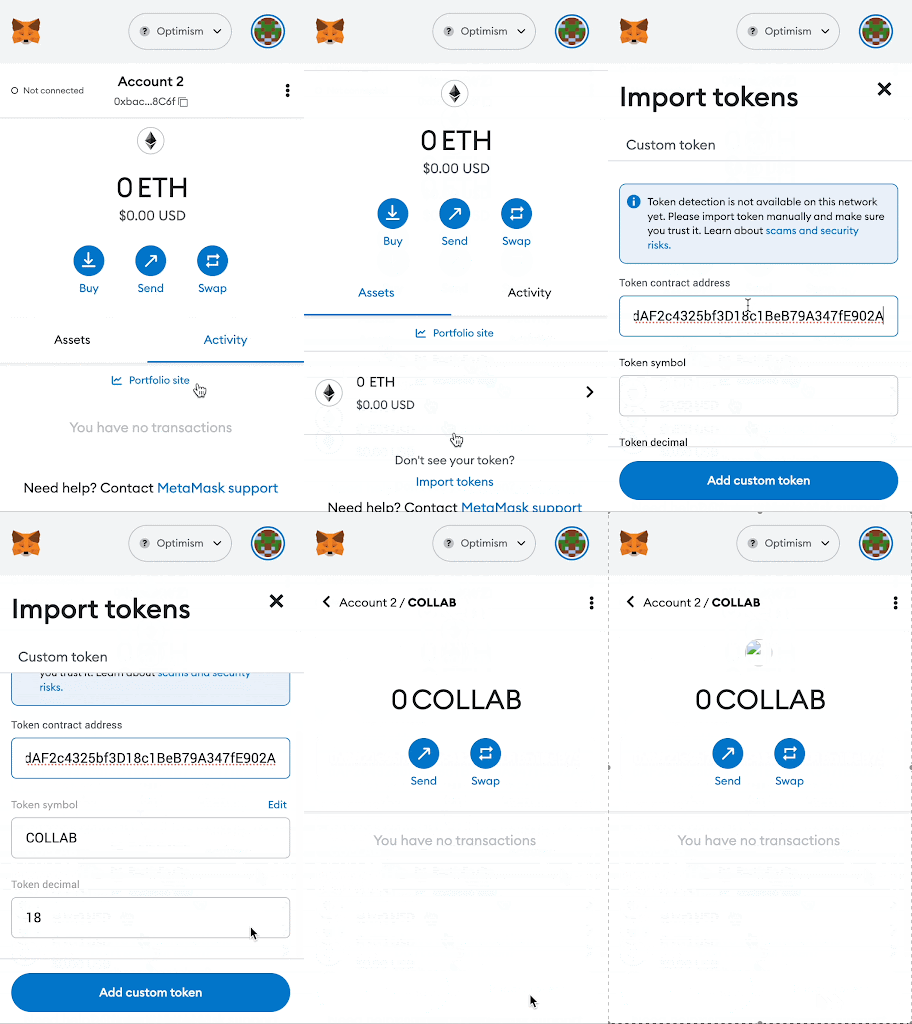
Import $COLLAB token to wallet Finally you need to import $COLLAB to see it in your wallet Tutorial 👇
- Switch to the Optimism network in your wallet
- Select “Assets” tab in metamask
- Press the "Import tokens" button at the bottom of the asset list screen.
- Enter “Token contract address”:
- “0x8B21e9b7dAF2c4325bf3D18c1BeB79A347fE902A”
- “Token Symbol”: “COLLAB
- “Token Decimal”: 18
- Your Collab tokens will now be visible in your MetaMask wallet.
It all starts here 👀 https://twitter.com/Collab_Land_/status/1626253185210884101?s=20